Advertisement
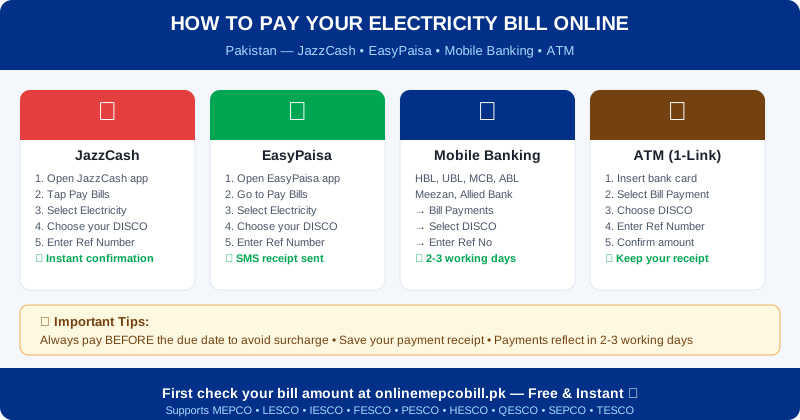
After checking your MEPCO bill, the next step is paying it on time. There are multiple convenient ways to pay your MEPCO bill online in Pakistan — from mobile apps to ATMs — without ever visiting a bank branch.
Pay MEPCO Bill via JazzCash
JazzCash is one of the most popular ways to pay MEPCO bill online in Pakistan:
- Open the JazzCash app on your phone
- Tap "Pay Bills"
- Select "Electricity"
- Choose "MEPCO" from the company list
- Enter your 14-digit reference number
- Confirm the bill amount and tap "Pay"
- You receive an SMS confirmation instantly
Pay MEPCO Bill via EasyPaisa
- Open the EasyPaisa app
- Go to "Pay Bills"
- Select "Electricity" → choose "MEPCO"
- Enter your reference number and confirm amount
- Complete payment from your EasyPaisa balance or linked bank
Pay MEPCO Bill via Mobile Banking
All major Pakistani banks support MEPCO bill payment through their mobile apps:
- HBL Mobile, UBL Digital, MCB Mobile, Allied Bank, Meezan Bank, Bank Alfalah
- Go to Bill Payments → Electricity → MEPCO → enter reference number
Pay MEPCO Bill via ATM
- Insert your bank card at any 1-Link ATM in Pakistan
- Select "Bill Payment"
- Choose "MEPCO"
- Enter your 14-digit reference number and bill amount
- Confirm and collect your receipt
Important Tips for MEPCO Bill Payment
- Always pay before the due date to avoid surcharge
- Save your payment receipt or screenshot the confirmation
- Online payments reflect in the MEPCO system within 2-3 working days
- If you pay after the due date, the "After Due Date" amount applies
⚡ Check Your Electricity Bill Now
Works for MEPCO, LESCO, IESCO, FESCO, PESCO, HESCO, QESCO, SEPCO & TESCO — Free, No Login
Check My Bill Free ⚡Advertisement