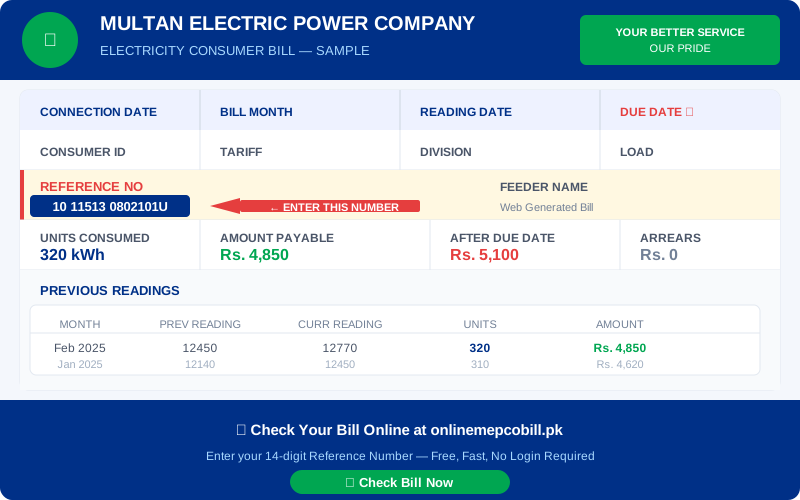
Checking your MEPCO bill online is one of the easiest things you can do as an electricity consumer in Pakistan. Instead of waiting for your paper bill to arrive, you can view your complete MEPCO online bill in seconds using your 14-digit reference number.
What is MEPCO Online Bill Check?
MEPCO online bill check is a free service that allows consumers of Multan Electric Power Company to view their electricity bill on the internet. The bill data is pulled directly from the official PITC government portal, giving you the exact same information as your paper bill.
What You Need for MEPCO Online Bill Check
- Your 14-digit MEPCO reference number (printed on any previous paper bill)
- A smartphone, tablet, or computer
- Internet connection
Step by Step — MEPCO Bill Check Online
Step 1: Find your reference number on your MEPCO paper bill. It is labeled "REFERENCE NO" and contains exactly 14 digits. Example: 01101234567890.
Step 2: Visit onlinemepcobill.pk — the free MEPCO online bill check tool.
Step 3: Select MEPCO from the company dropdown menu.
Step 4: Enter your 14-digit reference number in the input box. The box accepts numbers only — no spaces or dashes needed.
Step 5: Click the "Check My Bill" button. Your complete MEPCO bill opens instantly in a new tab.
What Does MEPCO Online Bill Show?
When you complete your MEPCO bill check online, you will see your consumer name, address, reference number, bill month, reading date, due date, units consumed, amount payable, after-due-date amount, and previous reading history.
MEPCO Bill Check — Common Questions
Is MEPCO online bill check free? Yes, completely free. No registration or login required.
How often is the MEPCO bill updated online? Your bill becomes available online 3 to 5 days after your meter reading date each month.
Can I use the online bill for payment? Yes. The online MEPCO bill is accepted at all banks, JazzCash, EasyPaisa, and ATMs for payment.
MEPCO Service Areas
MEPCO online bill check works for consumers in: Multan, Bahawalpur, Rahim Yar Khan, Sahiwal, Okara, Vehari, Lodhran, Muzaffargarh, Layyah, Khanewal, Pakpattan, Bahawalnagar, and D.G. Khan.
⚡ Check Your Electricity Bill Now
Works for MEPCO, LESCO, IESCO, FESCO, PESCO, HESCO, QESCO, SEPCO & TESCO — Free, No Login
Check My Bill Free ⚡